
Ask any finance team about the most stressful recurring task, and payroll usually lands near the top. It runs on a fixed date, tolerates no rounding errors, touches every employee, and invites regulatory scrutiny if anything slips. A payroll management system is the software built to take that pressure off your shoulders, handling salary calculation, tax deductions, compliance filings, and payslip generation in one connected workflow instead of scattered spreadsheets and last-minute panic.
This guide breaks down what such a system actually does, where it fits inside HR, how the software differs from manual processes, and what to weigh before you commit to one.
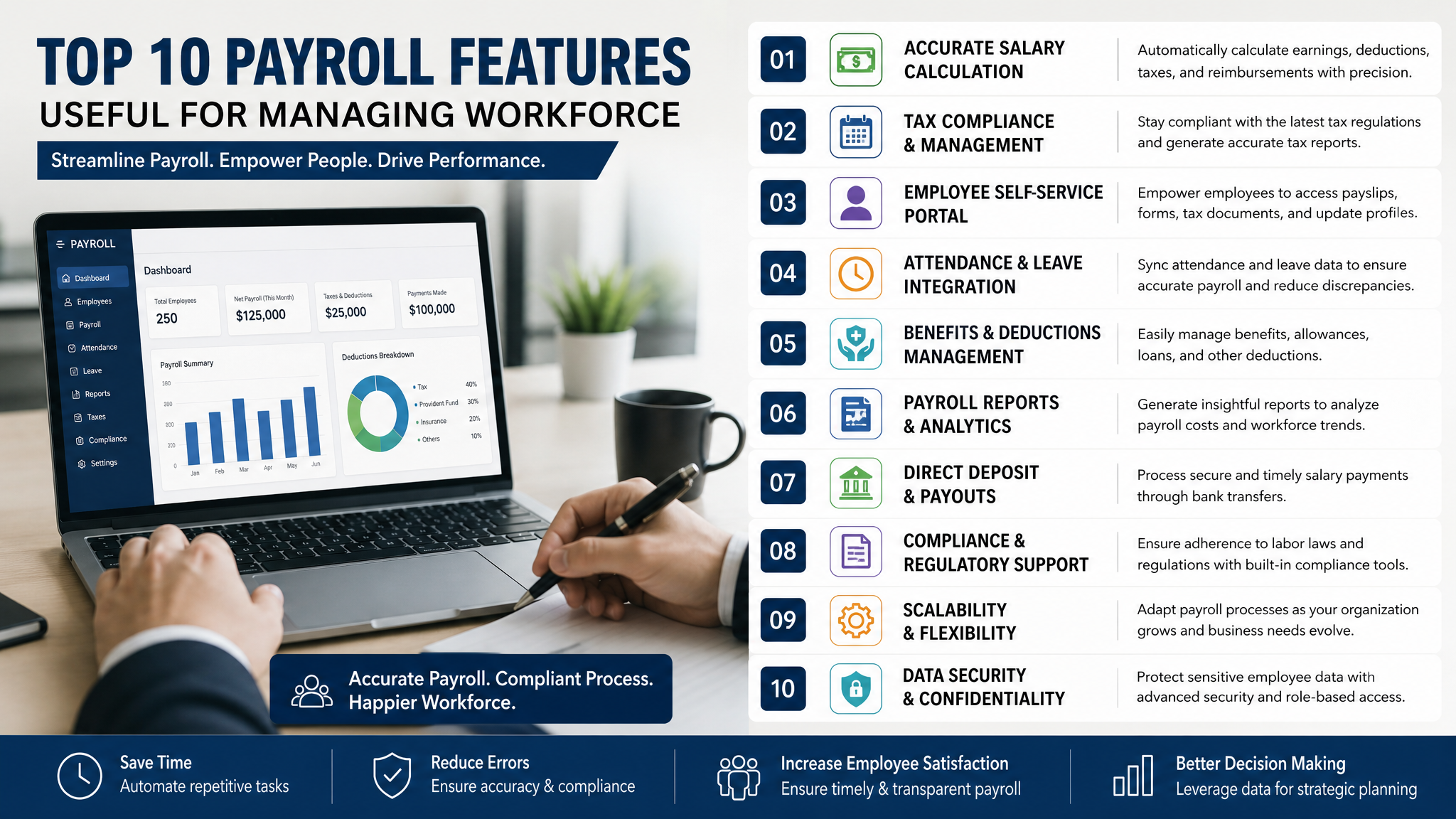
What a Payroll Management System Actually Does
At its core, payroll management automates the movement of money from your business to your people, and the reporting that surrounds it. But describing it as “salary calculation software” undersells the work.
A modern system pulls together several moving parts:
- Attendance and time data, so hours worked, leaves taken, and overtime feed directly into pay without manual re-entry that introduces errors.
- Salary structure logic, breaking gross pay into components like basic, allowances, and reimbursements, then applying the rules each component follows.
- Statutory deductions and contributions, calculating income tax, provident fund, professional tax, and other region-specific obligations without you memorizing every threshold.
- Payslip and reporting output: generating individual payslips and consolidated registers that finance and auditors can actually use.
The value isn’t any single calculation. It’s that these pieces stay in sync. Change someone’s salary mid-month, and the tax, contributions, and net pay adjust together instead of requiring you to update four different sheets and hope they match.
Why Payroll Management in HR Matters More Than People Assume
Payroll sits in an awkward spot. Finance owns the money, but the data that drives it, hiring, promotions, resignations, leave, comes from HR. When these two functions work off different records, mistakes multiply.
Consider how payroll management in HR connects to the wider employee lifecycle. A new hire’s bank details, tax declarations, and salary structure need to exist before their first payout. A departing employee triggers final settlement calculations. A promotion changes their pay component from a specific date, not retroactively across the whole month. Each of these is an HR event with a direct payroll consequence.
When payroll lives inside or beside an HR system, that information flows automatically. HR updates a record once, and payroll reflects it. Separate the two, and you get the familiar problems: someone gets paid at their old salary after a raise, a resigned employee still appears on the run, or tax declarations sit in an email thread nobody actioned.
There’s also the trust dimension. Employees judge an employer partly by whether their salary lands correctly and on time. A single wrong deduction erodes confidence faster than most managers realize. Getting payroll right isn’t just an accounting function; it’s part of how people experience working for you.
How Payroll Management Software Changes the Manual Workflow
Plenty of small businesses still run payroll on spreadsheets. It works until it doesn’t. The moment your headcount crosses a certain point, or your compliance rules get complicated, or one key person who “knows the formulas” leaves, manual payroll becomes a liability.
Here’s where payroll management software earns its place. The difference isn’t just speed; it’s reliability under conditions that break spreadsheets.
| Task | Manual / Spreadsheet Approach | Payroll Management Software |
|---|---|---|
| Tax calculation | Manually updated when rules change, easy to miss | Rules applied automatically, updated centrally |
| Payslip generation | Built and emailed one by one | Generated in bulk, accessible to employees |
| Compliance filing | Reports compiled from scratch each cycle | Statutory reports produced from existing data |
| Error tracing | Hunt through formulas and cells | Audit trail shows what changed and when |
| Scaling headcount | Effort grows with each new employee | Marginal effort stays low as you add people |
The audit trail point deserves emphasis. When a discrepancy surfaces months later, a spreadsheet rarely tells you who changed what. Good software logs every adjustment, which matters enormously during an audit or a disputed payment.
None of this means software is automatically the right call. A three-person startup with identical flat salaries and no complex deductions may genuinely be fine on a spreadsheet for now. The tipping point comes when the cost of an error, or the time spent avoiding one, exceeds what a tool would cost you.

The Core Components You Should Expect
Not every system is built the same, but a capable payroll management platform generally covers these areas. Use this as a rough checklist when evaluating options:
- Employee and salary master data, storing structures, bank details, and declarations in one place rather than scattered documents that go stale.
- Statutory compliance handling, keeping up with tax slabs, contribution rates, and filing formats so you aren’t manually chasing every regulatory change.
- Self-service access, letting employees download payslips, submit declarations, and view their own records without routing every request through HR.
- Integration with attendance and leave, so the numbers that drive pay come from a single source instead of being copied between systems.
- Reporting and reconciliation, giving finance the registers and summaries needed to close the books and answer auditor questions confidently.
Wings Office builds payroll functionality with these connections in mind, tying payroll to the attendance, leave, and employee records that feed it, so the data you enter once carries through the whole cycle instead of being re-keyed at each step.
Choosing the Right Fit for Your Business
Selecting a payroll system is less about finding the “best” tool and more about matching capability to your actual complexity. A few questions cut through the noise.
How many employees, and how varied are their pay structures?
A uniform salaried team is simple. A mix of full-time staff, contractors, commission earners, and hourly workers demands far more flexibility.
What are your compliance obligations?
Regional tax rules, statutory contributions, and filing requirements vary widely. A system that handles your specific jurisdiction well beats a feature-rich one that treats your local rules as an afterthought.
Where does your employee data already live?
If you run an HR system, attendance tool, or accounting software, payroll that integrates with those saves enormous duplication. Isolated payroll software creates the same data-sync problem you were trying to escape.
How much do you want employees to self-serve?
Every payslip request, tax query, or declaration update that employees handle themselves is time your HR team gets back.
Resist the pull of feature lists. A tool with fifty capabilities you’ll never use is worse than a focused one that nails the ten things you do every month. The right system is the one your team will actually adopt without a three-month fight.
Common Mistakes When Adopting Payroll Software
Even good software fails when the rollout is rushed. A few patterns come up repeatedly.
The first is migrating dirty data. If your existing records have wrong bank details, outdated salaries, or missing declarations, importing them wholesale just moves the mess into a new system. Clean the data before you migrate, not after the first failed payout.
The second is skipping a parallel run. Running your new system alongside the old process for one cycle, then comparing results line by line, catches configuration errors before they hit real paychecks. Teams that go live cold often discover a misconfigured tax rule the hard way, on payday.
The third is treating payroll as a set-and-forget purchase. Tax slabs shift, contribution rates change, and your workforce composition evolves. Someone needs to own ongoing configuration, not just the initial setup.
Frequently Asked Questions
Is a payroll management system different from HR software?
They overlap but aren’t identical. HR software manages the full employee lifecycle including recruitment, records, and performance, while a payroll management system focuses specifically on salary calculation, deductions, and compliance. Many modern platforms combine both, since payroll depends heavily on HR data. The practical benefit of a combined system is that employee changes update payroll automatically instead of requiring duplicate entry.
Can a small business benefit from payroll software, or is it only for large teams?
Small businesses often benefit the most, because they rarely have a dedicated payroll specialist and can least afford a costly error. Even with a handful of employees, automated tax calculation, compliance handling, and payslip generation remove hours of manual work and reduce risk. The value comes less from headcount and more from the complexity of your deductions and compliance obligations.
How does a payroll system handle changing tax and compliance rules?
A capable system updates statutory rules such as tax slabs and contribution rates centrally, so you don’t manually rewrite formulas each time regulations change. That said, no software removes your responsibility entirely. You still need to confirm the rules applied match your jurisdiction and verify filings, especially during transitions when new rates take effect.
What data do I need before setting up a payroll system?
At minimum, you need accurate employee records, verified bank details, agreed salary structures broken into components, tax declarations, and any statutory registration numbers your business requires for filings. Getting this data clean before migration matters more than the software choice itself, since inaccurate inputs produce inaccurate pay regardless of how good the system is.
Bringing It Together
A payroll management system exists to make a recurring, high-stakes task predictable. It replaces fragile spreadsheets with connected workflows, keeps HR and finance working off the same records, and protects you from the compliance errors that erode both budgets and employee trust.
The decision that actually matters isn’t whether payroll software helps, it clearly does past a certain scale. It’s whether the system you choose fits how your business already works: your headcount, your pay structures, your compliance rules, and the tools your team already uses. Match those honestly, and payroll stops being the dreaded end-of-month scramble and becomes something that simply runs.
If your payroll currently depends on manual effort or disconnected tools, mapping your process against the components above is a practical first step toward fixing it.


