
Key Takeaways
- A payroll management system automates salary calculation, tax deductions, compliance, and payment distribution so teams stop relying on manual spreadsheets.
- The right method depends on your headcount, in-house expertise, and compliance complexity, ranging from manual processing to fully outsourced or cloud-based options.
- Cloud-based platforms reduce compliance errors, scale with hiring, and give employees self-service access without heavy IT overhead.
- Choosing a system comes down to matching features to your actual workflow, not buying the longest feature list.
Paying people correctly and on time sounds simple until you actually do it at scale. Between shifting tax rules, statutory deductions, overtime calculations, and last-minute joiners or exits, payroll turns into one of the most error-prone functions in a business. A single miscalculation can trigger compliance penalties or, worse, erode employee trust. That’s why a payroll management system has become a non-negotiable part of running an organization of almost any size.
This guide walks through what these systems do, the methods available, how the process actually runs month to month, and how to pick one that fits your business instead of forcing your business to fit the software.
What a payroll management system actually does
A payroll management system is the software and process framework that handles everything involved in paying employees: calculating gross pay, applying deductions and taxes, distributing net salary, and keeping records for audits and reporting. Think of it as the engine that turns hours worked, salaries agreed, and rules imposed by law into an accurate paycheck.
Underneath that simple description sits a lot of complexity. The system needs to know each employee’s compensation structure, factor in bonuses and reimbursements, subtract provident fund and income tax, account for leaves and unpaid days, and then generate compliant payslips. Do that for five people and a spreadsheet might cope. Do it for fifty across different states or contract types, and manual methods start breaking down fast.
Why getting payroll right is worth the investment
Payroll is where a lot of quiet risk hides. Employees notice immediately when their pay is wrong, and repeated errors damage morale in ways that are hard to reverse. On the other side, tax authorities and labor regulators don’t accept “we made a mistake” as a defense. Late filings and incorrect deductions carry real financial consequences.
Beyond error prevention, good payroll gives you data you can actually use. Labor cost per department, overtime trends, and headcount growth all live inside payroll records. When that data is clean and accessible, finance and leadership can plan instead of guessing. This is a big reason payroll software for HR teams has moved from a back-office convenience to a strategic tool.
The main methods of payroll management
There’s no single correct way to run payroll. Most businesses use one of these approaches, and many switch as they grow.
Manual payroll relies on spreadsheets and human calculation. It costs nothing upfront and works for a handful of employees, but it’s slow and highly prone to error. The moment you add variable pay or multi-state compliance, it stops being viable.
Outsourced payroll hands the entire function to a third-party provider or accounting firm. You send them the inputs, they handle the rest. This removes the operational burden and is a common choice for a payroll solution for small businesses that lack an internal finance team. The trade-off is less control, ongoing fees, and dependence on the provider’s turnaround times.
In-house software means running dedicated payroll software on your own team. You keep control and visibility while automating the heavy lifting. This suits growing companies that want ownership of the process without doing math by hand.
Cloud-based payroll, a subset of in-house software, moves everything online so data updates in real time and can be accessed anywhere. It has become the default for most modern businesses, and we’ll come back to why later.
The phases of a payroll cycle
Payroll isn’t a single action. It runs as a repeating cycle, usually monthly, split into three broad phases.
Before the run, you gather and validate inputs: attendance, leave records, new hires, exits, salary revisions, and any one-off payments or deductions. This is the phase where most errors are introduced, because bad inputs guarantee bad output no matter how good the software is.
During the run, the system calculates gross pay, applies taxes and statutory deductions, and arrives at net pay for each employee. A well-configured platform does this in minutes and flags anomalies, like a salary that jumped unexpectedly, before anything is finalized.
After the run, you distribute salaries, generate payslips, file statutory returns, and update your accounting records. Reconciliation happens here too, matching what was paid against what was budgeted.
Core functions to expect from a payroll management system
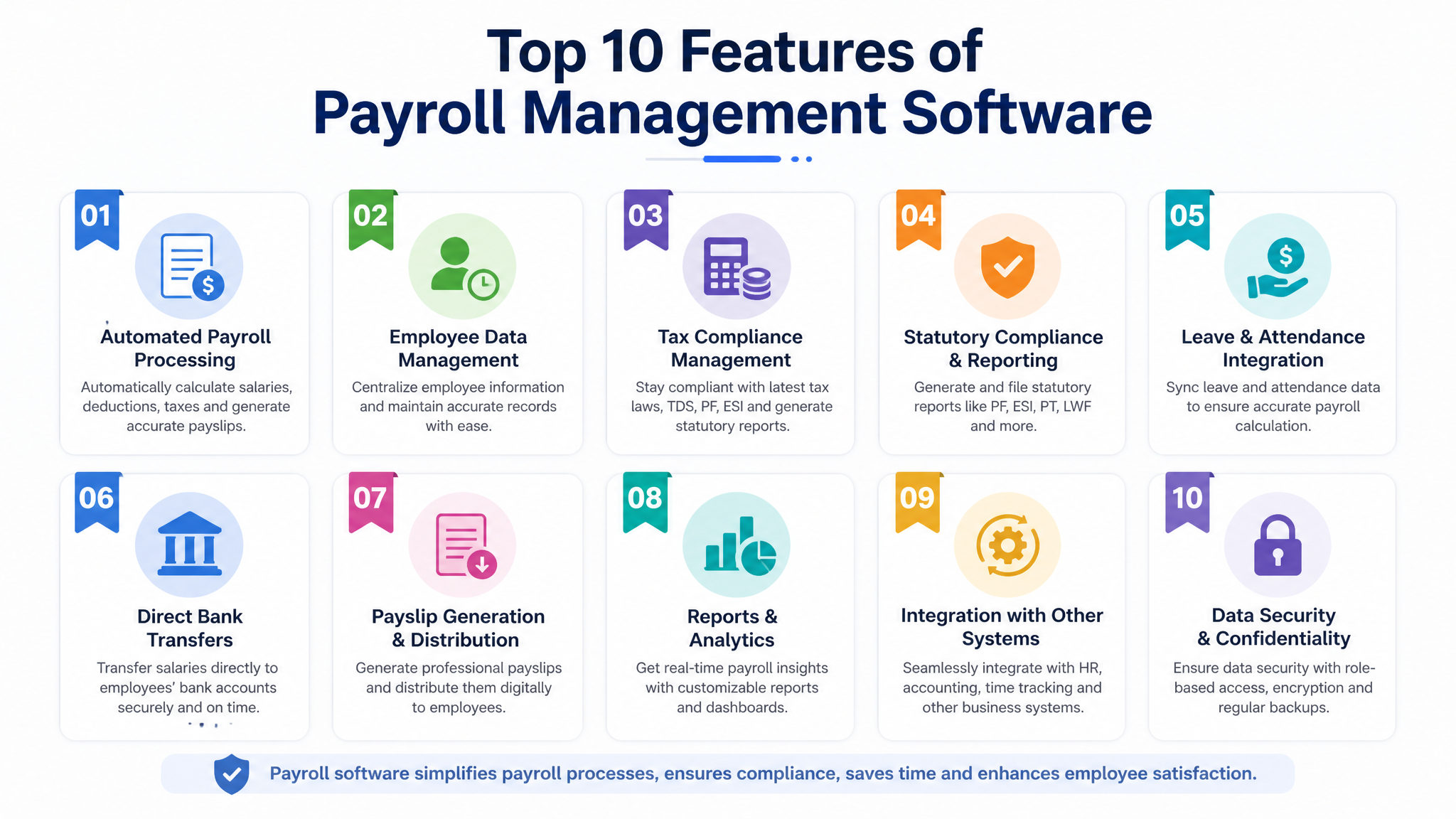
Different platforms package features differently, but a capable system should reliably handle the following. Each item below is where the real day-to-day value lives.
- Automated salary calculation that accounts for variable components like overtime, bonuses, and prorated pay for mid-month joiners without manual intervention.
- Tax and statutory compliance that stays current with changing rates and generates the filings and reports regulators require, reducing the chance of penalties.
- Employee self-service portals where staff can download payslips, view tax documents, and update personal details without routing every request through HR.
- Attendance and leave integration so worked days, absences, and approved leave flow directly into pay calculations instead of being re-entered by hand.
- Reporting and analytics that turn payroll data into readable insight on labor costs, department spend, and trends leadership can act on.
How different industries use payroll systems
The core function stays the same, but priorities shift depending on how a business operates.
A manufacturing company with shift workers cares most about accurate overtime and attendance integration, since a large share of pay is variable. A software firm with salaried staff spread across locations leans harder on multi-region compliance and self-service. Retail and hospitality businesses, which often run high headcounts with heavy turnover and hourly wages, need systems that onboard and offboard people quickly without breaking the pay cycle.
Consider a hypothetical staffing agency managing several hundred contract workers across multiple clients. Their challenge isn’t calculating a single salary structure; it’s handling dozens of different rates, billing cycles, and compliance requirements at once. For them, a rigid system built for salaried employees would collapse, while a flexible platform designed for variable workforces becomes essential. The lesson: match the tool to how your workforce actually gets paid, not to a generic feature checklist.

Modernizing an outdated payroll foundation
Plenty of businesses run payroll on a patchwork: a spreadsheet here, a legacy desktop tool there, and an accountant filling the gaps. It works until it doesn’t. The warning signs are familiar, month-end that eats days of manual effort, recurring calculation disputes, missed filing deadlines, and a total lack of visibility into labor costs.
Modernizing doesn’t have to mean ripping everything out overnight. A sensible approach starts with mapping your current process, identifying where errors and delays cluster, and then choosing a system that fixes those specific pain points first. The goal is a single source of truth for pay data, one that connects with your attendance, HR, and accounting systems instead of forcing manual re-entry between them.
Why a cloud-based payroll management system makes sense
The shift to cloud-based platforms isn’t just a technology trend; it solves problems that on-premise and manual methods never could.
Because everything lives online, your data stays current in real time and is accessible from anywhere, which matters when your finance team, HR, and employees aren’t all in one office. Updates to tax rules and compliance requirements are pushed by the vendor, so you’re not manually patching software or hoping your spreadsheet formulas still match current law. Scaling is straightforward too: adding twenty new hires doesn’t require new infrastructure, just new records.
Cloud systems also lower the IT burden. There’s no server to maintain, no local backups to worry about, and security is handled at the platform level. For a growing business, this combination of accessibility, automatic compliance, and low overhead is exactly why cloud has become the standard rather than the exception. It’s also what makes modern payroll software for HR teams genuinely usable without a dedicated systems administrator.
How to choose the right payroll management software
The best system is the one that fits your reality, not the one with the longest feature list. Work through these considerations before committing.
Start with your headcount and growth plan. A tool that’s perfect at ten employees may buckle at a hundred, so buy for where you’ll be in two years, not just today. Next, check compliance coverage for the regions and worker types you actually employ, since gaps here are the most expensive to discover late.
Integration matters more than most buyers expect. If your payroll software for HR doesn’t talk to your attendance and accounting tools, you’ll recreate the manual re-entry you were trying to escape. Evaluate ease of use honestly by involving the people who will run it every month, not just the person signing the contract. Finally, weigh support quality and total cost, including setup and per-employee fees, against the time and risk the system removes.
For businesses evaluating options, platforms like Wings Office bring payroll together with broader office and HR management in one connected system, which suits teams that want their attendance, employee records, and pay running on a single foundation rather than stitched across disconnected tools. Larger enterprises with complex multi-country needs may look toward heavyweight global providers, while a very small team might start with a lightweight payroll solution for small businesses and upgrade later. The right answer depends entirely on your scale and complexity.
| Consideration | What to check |
|---|---|
| Scale | Does it handle your projected headcount, not just current? |
| Compliance | Coverage for your regions and worker types |
| Integration | Connects with attendance, HR, and accounting |
| Usability | Simple enough for monthly operators to run confidently |
| Total cost | Setup, per-employee fees, and support quality combined |
Payroll is one of those functions where the cost of getting it wrong far outweighs the cost of doing it well. Whether you’re moving off spreadsheets for the first time or replacing a system that’s stopped keeping up, the priority is the same: clean data, reliable compliance, and a process your team can run without dread every month. Start by identifying where your current setup breaks down, then choose the system that closes those gaps.
Frequently Asked Questions
How is a payroll management system different from HR software?
Payroll systems focus specifically on calculating and distributing pay, applying taxes, and handling statutory compliance. HR software covers a broader range, including recruitment, performance, and employee records. Many modern platforms combine both, which reduces duplicate data entry between the two functions.
Is a payroll management system worth it for a very small business?
Even small teams benefit, because errors and compliance penalties don’t scale down with headcount. A lightweight payroll solution for small businesses removes manual calculation risk and saves hours each month, often paying for itself in avoided mistakes and reclaimed time.
How long does it take to set up a payroll system?
It depends on complexity, but a straightforward setup for a small to mid-sized team can be running within a few weeks. The main time investment is entering accurate employee data and configuring compliance rules correctly, not the software installation itself.
Can a payroll system handle both salaried and hourly workers?
Most capable systems support both, along with contract and variable-pay workers. If your workforce mixes pay types, confirm this explicitly during evaluation, since some tools built purely for salaried staff struggle with overtime and hourly calculations.


