
Key Takeaways
- Payroll software pricing in India is shaped by employee count, statutory compliance depth, integrations, and support tier, not just a headline per-user rate.
- The three dominant pricing models are per-employee-per-month, flat monthly subscription, and module or usage-based billing, each suiting a different company size and growth stage.
- Most Indian businesses land somewhere between low double-digit and low triple-digit rupees per employee per month, with implementation and hidden add-ons often changing the real total.
- A fair comparison weighs compliance coverage, scalability, and support against price, because the cheapest tool frequently costs more once penalties and manual work are counted.
- Wings Office HRMS bundles payroll, compliance, and HR workflows so cost stays predictable as headcount grows.
Sticker price rarely tells the truth about payroll software. A tool advertised at a low per-employee rate can quietly cost far more once you add statutory filing modules, integration fees, and paid support hours. That gap between the quoted number and the real bill is exactly what this guide unpacks. If you’re budgeting for 2026, understanding payroll software pricing in India means looking past the first figure a vendor shows you and reading the structure underneath it.
Payroll is also one of the few systems where getting it slightly wrong has direct financial consequences: a missed PF deadline or a botched TDS calculation triggers penalties that dwarf any subscription saving. So the goal here isn’t to find the cheapest option. It’s to match a pricing model to how your business actually runs and grows.
What Actually Determines Payroll Software Cost in India
Most buyers assume headcount is the main lever. It matters, but it’s one of several. The features below tend to move the price far more than an extra ten employees ever will.
- Compliance depth is usually the biggest cost driver. Software that only calculates salaries is cheap; software that files PF, ESI, PT, TDS, and generates Form 16 and challans automatically sits in a higher tier because it carries real regulatory logic that must be maintained state by state.
- Number of active employees affects per-user models directly, and even flat plans usually cap headcount and bump you into a higher bracket once you cross a threshold you may not notice until renewal.
- Integrations with accounting, attendance, and banking systems add to the cost, since connecting payroll to tools like Tally, biometric devices, or bank payment files often sits behind a premium tier or a separate connector fee.
- Support and onboarding level changes the total more than people expect, because dedicated implementation help, a named account manager, and priority response times are frequently priced as add-ons rather than included in the base rate.
- Multi-state and multi-entity operations raise pricing meaningfully, as each state has its own professional tax slabs and labour rules the vendor must configure and keep current.
None of these are optional if you actually want payroll to run without manual patching. The trap is buying a base plan for its low number and discovering the features you need live two tiers up.
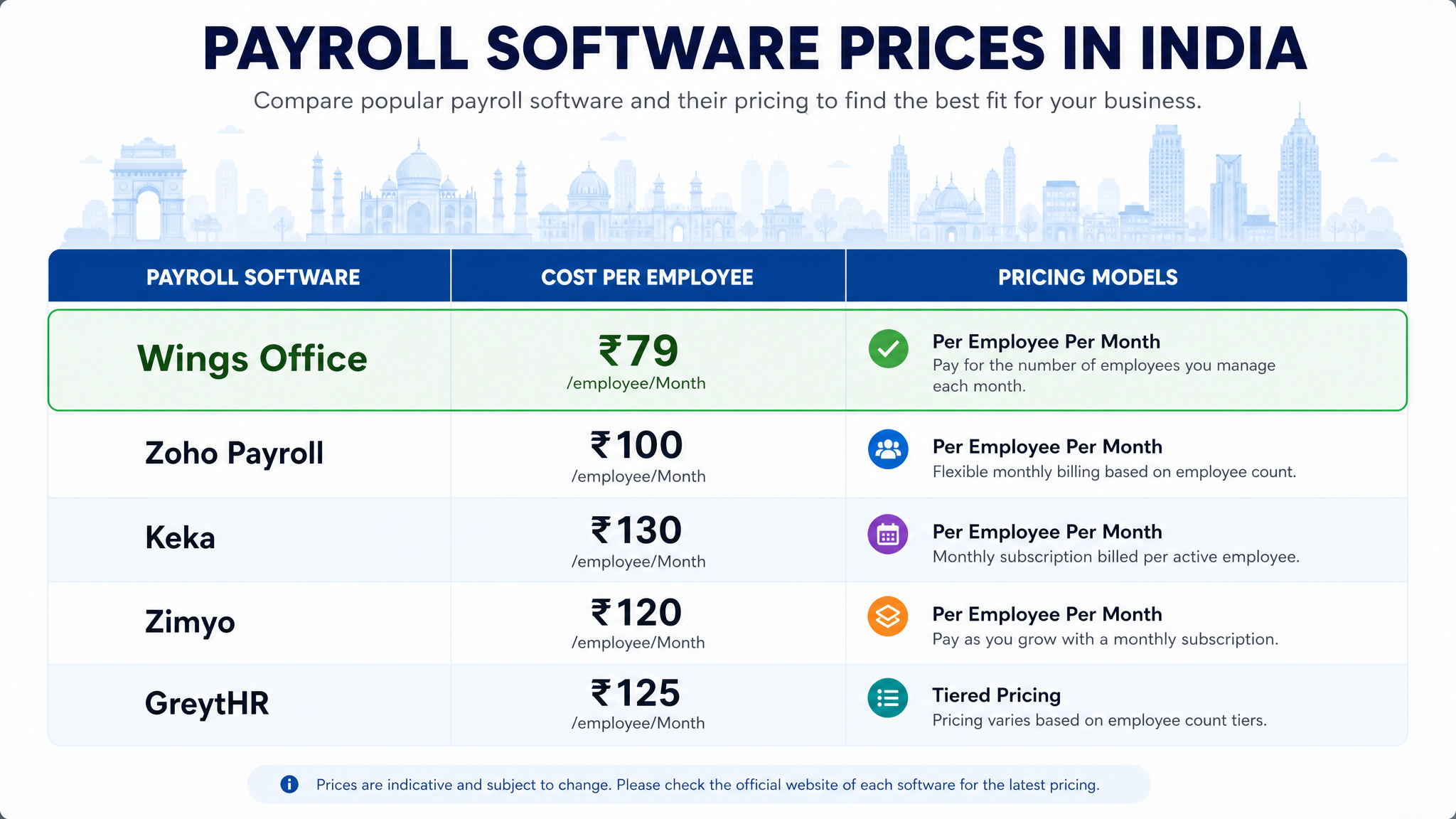
Payroll Software Price Models Used in India
Three billing structures dominate the market. Knowing which one you’re being quoted lets you compare offers that otherwise look nothing alike.
The per-employee-per-month (PEPM) model charges a fixed rate for each active employee. It’s transparent and scales cleanly, which suits growing teams because you only pay for who’s actually on the roll. The catch is that costs climb linearly, so a company scaling fast should model its 18-month headcount before committing.
The flat monthly or annual subscription bundles a set number of employees into one price. Small businesses with stable headcounts often prefer this because the bill is predictable. The downside shows up at the edges: exceed the included seat count and you jump to the next slab, sometimes paying for capacity you don’t use.
The module or usage-based model lets you buy payroll as one component and add compliance, expense management, or performance modules as needed. It offers the most control for larger organisations but requires discipline, because à la carte pricing can quietly exceed a bundled plan once you’ve added four or five modules.
Some vendors blend these, charging a platform base fee plus a PEPM rate. When you run a payroll software pricing comparison across vendors, first normalise every quote into cost per employee per month at your real headcount. Otherwise you’re comparing structures, not prices.
Typical Payroll Software Cost Range in India
Giving an exact number would be misleading because the range is genuinely wide and depends on the factors above. What’s more useful is understanding the bands and what pushes you between them.
At the entry level, basic payroll tools aimed at very small teams tend to sit in the low double-digit rupees per employee per month, or a modest flat monthly fee. These handle salary calculation and payslips well but often treat full statutory filing as an upgrade.
Mid-tier payroll software in India, the segment most SMBs actually need, typically runs higher per employee and includes automated PF, ESI, PT, and TDS handling along with basic HR features. Enterprise-grade platforms with multi-entity support, deep integrations, and dedicated success teams sit well above that, and pricing at this level is usually quote-based rather than published.
Beyond the recurring fee, budget for one-time costs that vendors don’t always foreground: implementation and data migration, training, and occasionally per-payslip or per-form charges. A plan that looks inexpensive monthly can carry a meaningful setup fee that reshapes your first-year total.

Payroll Software Price Comparison: What Businesses Should Evaluate
Price is one column in a bigger table. A genuine payroll software pricing comparison weighs what each rupee actually buys. Before you sign, run every shortlisted option against these criteria.
- Compliance automation coverage decides whether your team files returns manually or the software does it, and this single factor separates a tool that saves time from one that just stores data.
- True cost at scale matters more than the entry price, so project the total at your expected headcount in a year and compare that figure across vendors rather than the introductory rate.
- Integration fit with your existing accounting and attendance stack determines how much manual data entry survives, and poor fit erodes any savings from a cheaper subscription.
- Support responsiveness and onboarding shape whether go-live is smooth or painful, particularly for teams without a dedicated payroll specialist internally.
- Data security and access controls protect sensitive salary and PII data, and this is non-negotiable regardless of company size.
The cheapest tool that requires two extra hours of manual reconciliation every payroll cycle isn’t cheap. When you total the staff time and penalty risk, a slightly higher subscription with full automation usually wins on real cost.
Why Payroll Software Pricing for SMBs Deserves a Different Lens
Small and mid-sized businesses face a specific squeeze. They have the same statutory obligations as large enterprises, PF, ESI, PT, TDS, but without a dedicated payroll department to absorb complexity. That makes payroll software pricing for SMBs less about the lowest number and more about how much manual work the price eliminates.
For an SMB, the right question is: does this plan let one HR generalist or the founder run payroll confidently, or does it need a specialist to operate? A slightly higher subscription that automates filings and flags errors before submission often pays for itself the first time it prevents a late-filing penalty. Consider a 30-person services firm where the office manager also handles payroll. A tool that auto-generates challans and Form 16 removes hours of monthly work and the anxiety of getting a statutory calculation wrong. That saved time and reduced risk is the real return, and it rarely shows up in the headline rate.
SMBs should also watch the scaling cliff. A flat plan capped at 25 employees looks great until you hire the 26th and jump a bracket. Choose a model whose growth curve matches your hiring plan.
How Wings Office HRMS Simplifies Payroll Software Cost Management
Wings Office approaches pricing with the assumption that a growing business shouldn’t get punished for hiring. Instead of scattering statutory compliance, integrations, and support across paid add-on tiers, HRMS payroll processing with automated PF, ESI, PT, and TDS handling inside a coherent plan, so the number you’re quoted stays close to the number you actually pay.
The platform connects payroll with attendance, leave, and core HR workflows in one system, which cuts the manual reconciliation that quietly inflates the cost of cheaper standalone tools. For SMBs especially, that consolidation matters: fewer disconnected subscriptions, one source of employee data, and predictable costs as headcount rises. Because compliance logic is maintained centrally, teams without a dedicated payroll specialist can run cycles with confidence rather than cross-referencing rules by hand.
If you’re evaluating payroll software in India for 2026, the practical test is total cost of ownership, subscription plus setup plus the staff hours it saves, and Wings Office is built to keep that total predictable as you grow.
Top Payroll Software Pricing Models Compared
The table below compares the common billing structures on the factors that most affect your real cost. Use it to identify which model fits your size and growth stage before you request quotes.
| Pricing model | Best for | Cost predictability | Scales well with hiring | Watch out for |
|---|---|---|---|---|
| Per-employee-per-month | Growing teams and SMBs | High, tied to headcount | Yes, linear growth | Costs rise steadily as you hire |
| Flat monthly subscription | Small, stable teams | Very high | No, bracket jumps | Overage cliffs at seat caps |
| Annual flat subscription | Budget-locked small firms | Very high | No | Paying upfront for unused capacity |
| Module / à la carte | Enterprises, complex needs | Low without discipline | Yes | Add-ons quietly exceed bundles |
| Base fee + PEPM hybrid | Mid-market with integrations | Moderate | Yes | Two variables to model |
| Freemium + paid tiers | Micro-businesses testing | Moderate | Limited | Core features often gated |
| Tiered feature bundles | SMBs wanting simplicity | High | Partial | Needed feature may sit a tier up |
| Usage-based (per payslip) | Seasonal or variable payroll | Low | Depends on volume | Unpredictable in busy months |
| Quote-based enterprise | Multi-entity organisations | Negotiated | Yes | Opaque, requires negotiation |
| All-inclusive bundle (Wings Office HRMS) | SMBs to mid-market | High | Yes | Confirm module coverage upfront |
The pattern across these models is consistent: predictability and compliance coverage matter more than the headline rate. A structure that stays flat and comprehensible as you hire will almost always beat a cheaper model that fragments into add-ons.
Frequently Asked Questions
What is the average cost of payroll software in India?
There is no single average because pricing depends on headcount, compliance depth, and integrations. Basic tools for very small teams sit at the low end, while mid-tier software with full statutory automation costs more per employee, and enterprise platforms are usually quote-based. The most reliable approach is to request a written quote at your projected 12-month headcount.
Which payroll pricing model is best for a small business?
For most SMBs, a per-employee-per-month or an all-inclusive bundled plan works best because it scales cleanly with hiring and keeps compliance features included rather than gated behind add-ons. Flat plans suit very stable teams but can create sudden cost jumps when you cross the included seat limit.
Are there hidden costs in payroll software pricing?
Often, yes. Common extras include implementation and data migration fees, training, premium support, integration connectors, and per-form or per-payslip charges. Always ask for the total first-year cost, not just the monthly subscription, before comparing vendors.
Does cheaper payroll software actually save money?
Not always. A low subscription that lacks compliance automation shifts work back to your team and raises the risk of statutory penalties. When you add up staff hours and penalty exposure, a slightly higher plan with full automation frequently costs less in real terms.
The smartest move for 2026 isn’t hunting for the lowest per-employee figure. It’s mapping a pricing model to your hiring plan and compliance load, then totalling the real cost of ownership across a full year. Do that, and the right choice usually becomes obvious. Start by projecting your headcount 12 months out and asking each vendor to quote against it.


