
Key Takeaways
- An ESS payroll system lets employees handle routine tasks like payslip downloads, leave requests, and tax declarations themselves, cutting the admin load on small HR teams.
- For SMBs, the right platform balances cost, ease of setup, local compliance support, and self-service depth rather than chasing enterprise features you won’t use.
- Security matters: look for role-based access, encryption, and audit trails before trusting a vendor with salary and personal data.
- Implementation usually takes a few weeks when you prepare clean employee data and run a parallel payroll cycle before going fully live.
- Wings Office is built for Indian SMBs that want self-service payroll without the complexity or price tag of large enterprise suites.
If your HR person spends the last week of every month fielding the same questions, “Where’s my payslip?”, “How many leaves do I have left?”, “Can you share my Form 16?”, you don’t have a payroll problem. You have a self-service problem. An ESS payroll system solves exactly that by handing routine tasks back to employees, so your small team stops acting as a human help desk.
This guide walks through how to pick the best ESS payroll system for a small or mid-sized business: what to look for, how pricing actually works, how setup goes, and how a few real options compare. By the end, you’ll know whether self-service payroll is worth the switch and which features are non-negotiable.

What an ESS payroll system actually does for a growing SMB
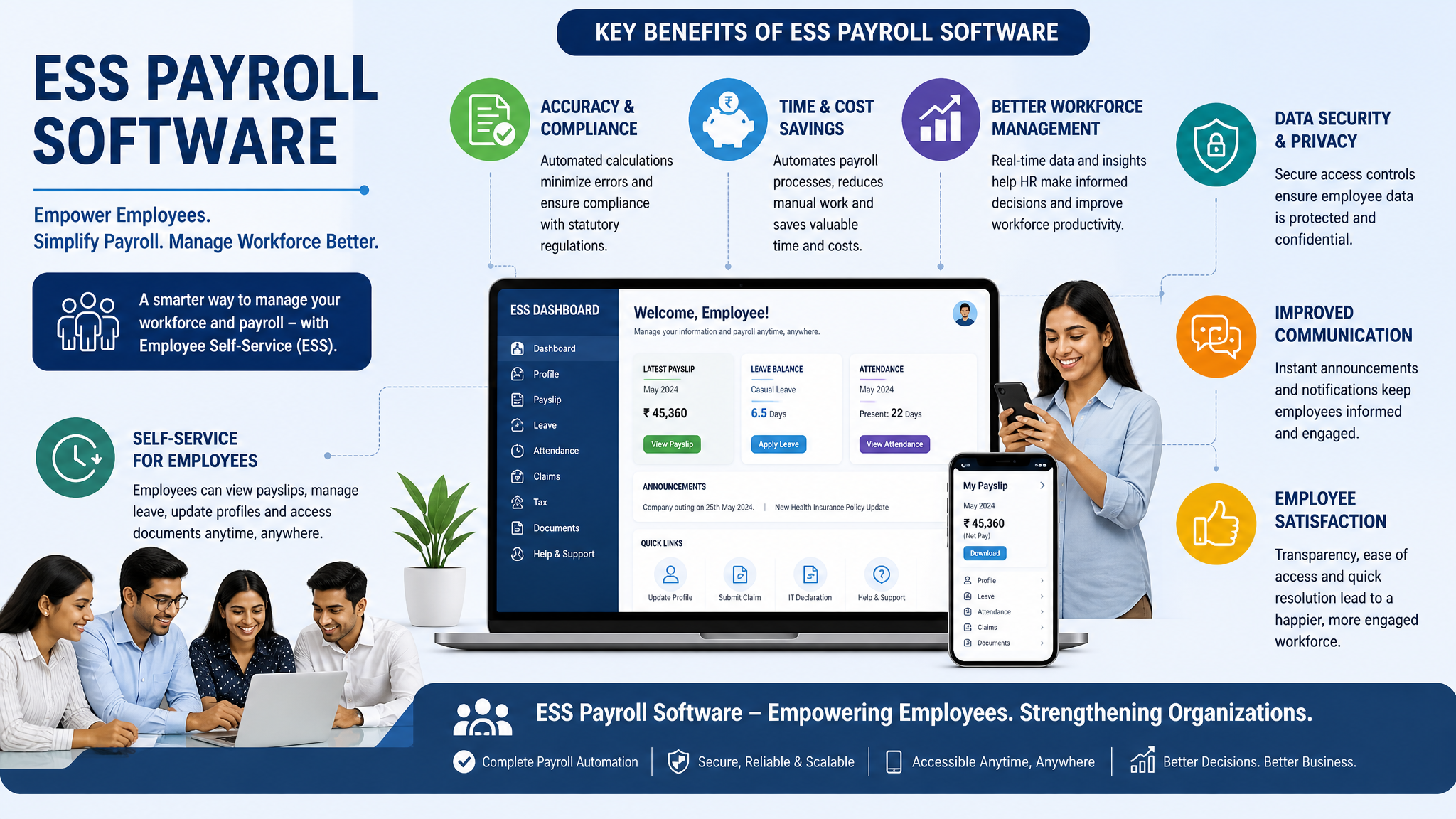
ESS stands for Employee Self-Service. Instead of routing every payslip, leave balance, and tax declaration through HR, an ESS payroll system gives each employee a secure login to a portal or app where they handle those tasks on their own.
That shift sounds small. In practice it reshapes how a lean team spends its time. When fifty people can each pull their own payslip at 11 PM without pinging anyone, your payroll admin gets back hours every cycle. The system still runs the actual salary calculation, tax deductions, and compliance filings in the background. The difference is who touches the data for routine lookups.
For SMBs specifically, the appeal is leverage. You rarely have a full HR department. You might have one person wearing three hats, or a founder still approving leave requests between sales calls. An ess payroll portal removes the friction that makes payroll feel heavier than it should at this size.
Benefits of ESS payroll that employees actually feel
Decision-makers often frame payroll upgrades around admin savings. Fair enough. But adoption lives or dies on whether employees find the tool useful, so it’s worth looking at their side.
The most immediate benefit is access. Employees get their payslips, tax documents, and salary breakdowns on demand instead of waiting for someone to email them. During loan applications or visa paperwork, that instant access removes a genuine source of stress.
Transparency is the quieter benefit. When someone can see exactly how their gross became their net, how much tax was deducted, what reimbursements cleared, there are fewer disputes and far less suspicion. People trust a number they can trace.
Self-service also covers the practical stuff: applying for leave and watching the balance update, submitting investment proofs before the tax window closes, updating a changed bank account or address without routing it through three people. Each of these is minor on its own. Together they make the employment experience feel organised, which matters more for retention than most companies admit.
How to add employees to an ESS payroll system
Onboarding employees into a new system is where a lot of SMBs stall, usually because the data is messy. Getting this part right saves weeks of cleanup later.
Most platforms support three ways to add people:
- Bulk import via spreadsheet, which is the fastest route when you’re migrating an existing team. You download the vendor’s template, fill in names, salary structures, PAN, bank details, and date of joining, then upload it in one pass. This is ideal for the initial go-live when you have twenty or two hundred records to move at once.
- Manual single entry, which works best for ongoing hires after the system is live. You add one person through a form, assign their salary components and reporting manager, and trigger their self-service invite. It’s slower but gives you control over edge cases like unusual pay structures.
- Integration with your existing HR or ATS tool, where new hires flow in automatically once they’re marked as joined. This suits companies already running a recruitment or HRMS platform and wanting to avoid double entry.
Whichever route you pick, validate the data before you commit. The three fields that cause the most downstream pain are PAN, bank account numbers, and salary component mapping. A single wrong digit in a bank field means a failed salary transfer, and that erodes trust in the whole system on day one.
ESS payroll pricing for small businesses
Pricing is where SMBs get surprised, so it helps to understand how vendors actually charge before you sit through a demo.
Most ESS payroll software uses a per-employee-per-month model. You pay a base platform fee plus a charge for each active employee, so cost scales with headcount. For a team of thirty, this is usually affordable. The trap is the add-ons.
Watch for these cost layers that sit outside the headline price:
- Implementation or onboarding fees, a one-time charge for setup, data migration, and configuration that some vendors quote separately from the monthly subscription and others bundle in.
- Compliance and filing modules that may be priced as extras, especially if you need PF, ESI, professional tax, and TDS handling rather than just payslip generation.
- Tiered feature gates, where self-service, mobile access, or an ess payroll portal sits behind a higher plan even though it was the whole reason you came shopping.
For a realistic budget, a small business should expect the self-service layer to be included in a mid-tier plan rather than treated as premium. If a vendor charges extra for employees to see their own payslips, that’s a signal the product wasn’t built with SMBs in mind.
A useful habit: ask every vendor for the total annual cost at your actual current headcount and at your projected headcount twelve months out. The gap between those two numbers tells you how painful growth will be on that platform.

Choosing the right ess hr and payroll system: a comparison
The market runs from lightweight payroll tools to full enterprise suites. For an SMB, the sweet spot is a system that covers payroll, compliance, and self-service without forcing you into modules you’ll never open. Here’s how a few known options stack up against the criteria that matter at this size.
| Platform | Best suited for | Self-service depth | SMB fit |
|---|---|---|---|
| Wings Office | Indian SMBs wanting payroll plus self-service without enterprise complexity | Payslips, leave, tax declarations, document access through employee portal and app | Strong, built around small-team workflows and local compliance |
| Zoho Payroll | Small businesses already using the Zoho ecosystem | Employee portal with payslips, declarations, and loan requests | Good, especially if you run other Zoho products |
| RazorpayX Payroll | Startups wanting automated payouts and compliance | Self-service for payslips and tax proofs | Good for early-stage teams, lighter on deeper HR workflows |
| greytHR | SMBs needing broader HR plus payroll | Established self-service portal and mobile app | Strong, though can feel feature-heavy for very small teams |
The point of this table isn’t to crown a single winner. It’s to show that “best” depends on where you are. A ten-person startup and a two-hundred-person manufacturer have different needs, and the right ess hr and payroll system is the one whose self-service and compliance depth match your reality.
If you’re an Indian SMB that wants employees to self-serve without paying for layers of enterprise HR you won’t touch, Wings Office is built specifically for that gap. It keeps the self-service experience simple while handling the compliance work that quietly eats time behind the scenes.
ESS payroll implementation steps that keep you out of trouble
A clean rollout follows a predictable sequence. Skip steps and you’ll spend the first month firefighting instead of running payroll.
- Lock your salary structure and compliance setup first. Define your salary components, deductions, and applicable statutory rules before touching employee data. If the foundation is wrong, every payslip is wrong.
- Migrate and validate employee data. Import your roster, then check PAN, bank details, and component mapping against source records. Treat this as a verification exercise, not just an upload.
- Configure the self-service layer. Set what employees can see and do, payslip access, leave rules, declaration windows, before you send invites. Decide approval flows now so managers aren’t confused later.
- Run a parallel payroll cycle. Process one full month in the new system alongside your existing method and reconcile the results. Any mismatch surfaces here, safely, before real money moves.
- Go live and onboard employees. Send self-service invites with a short how-to, and expect a cluster of questions in the first cycle. Communication at this stage drives adoption more than any feature.
Most SMBs complete this in two to four weeks. The variable is almost never the software. It’s how clean your existing data is and how quickly you make decisions on policies like leave rules and approval hierarchies.
Is ESS payroll secure enough to trust with salary data
Short answer: a well-built system is more secure than the spreadsheet-and-email workflow it replaces. But security varies by vendor, so you should verify rather than assume.
The things that matter most are access control and data protection. Role-based access ensures an employee sees only their own records while a manager sees their team and HR sees everything. Encryption, both in transit and at rest, protects the data as it moves and as it sits in storage. An audit trail that logs who viewed or changed what gives you accountability when something looks off.
For an ess payroll portal in particular, ask about authentication. Multi-factor login, session timeouts, and password policies are basic hygiene for anything holding salary and PAN data. Also ask where the data is hosted and whether the vendor aligns with Indian data protection expectations, since payroll contains some of the most sensitive information you hold about your people.
The honest caveat: no system removes human risk. A shared password or an over-broad admin role defeats good architecture. So the security question is really two questions, is the platform built securely, and are you configuring it carefully. The best vendors make the secure default the easy one.
Frequently Asked Questions
What is the difference between ESS payroll and regular payroll software?
Regular payroll software focuses on calculating salaries, deductions, and compliance from the admin side. ESS payroll adds an employee self-service layer on top, letting staff access payslips, apply for leave, submit tax declarations, and update their details without going through HR for every request.
How long does it take to set up an ESS payroll system for a small business?
Most small businesses go live within two to four weeks. The timeline depends far more on how clean your existing employee data is and how quickly you finalise policies like leave rules and approval flows than on the software itself. Running a parallel payroll cycle before full go-live is the step that adds the most confidence.
Can employees access an ESS payroll portal on mobile?
Most modern platforms, including Wings Office, offer mobile access either through a dedicated app or a responsive portal. This matters for SMBs with field staff or distributed teams who need payslips and leave balances on their phones rather than at a desk.
Is my employees’ salary data safe in an ESS payroll system?
A reputable ESS payroll system uses role-based access, encryption in transit and at rest, and audit logging to protect sensitive data. It is generally more secure than managing payslips over email. Still, verify the vendor’s authentication options and hosting practices, and configure admin roles carefully to avoid internal exposure.
Where to go from here
The best ESS payroll system for your business isn’t the one with the longest feature list. It’s the one that matches your headcount, handles your compliance correctly, and makes self-service so obvious that employees actually use it. Start by auditing where your HR time currently leaks, then test whether a shortlisted platform plugs those exact gaps in a trial month.
If you’re a small or mid-sized business in India looking for payroll with genuine self-service, without the overhead of an enterprise suite, Wings Office is worth a closer look. Book a demo, run a parallel cycle, and see how much of that end-of-month question queue simply disappears.


