
MISS PUNCH MANAGEMENT
Miss Punch Today? No Problem.Your HR team manages it.
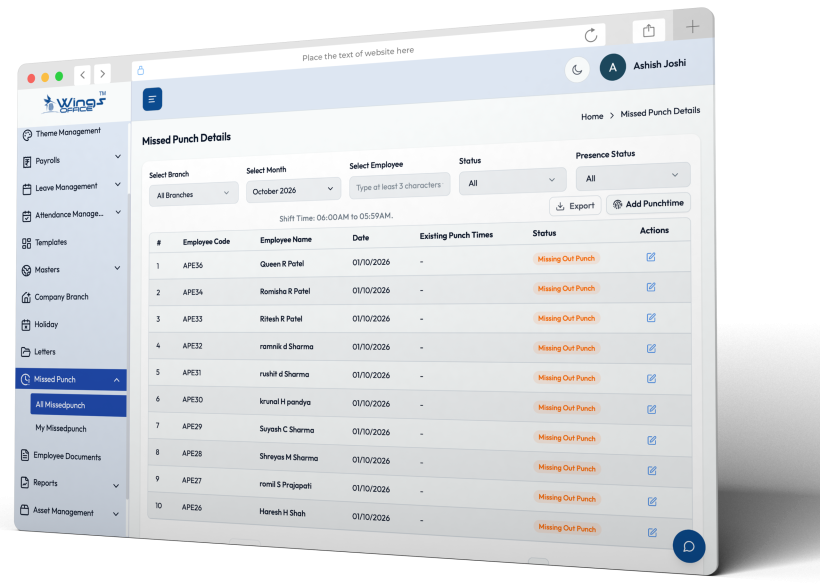
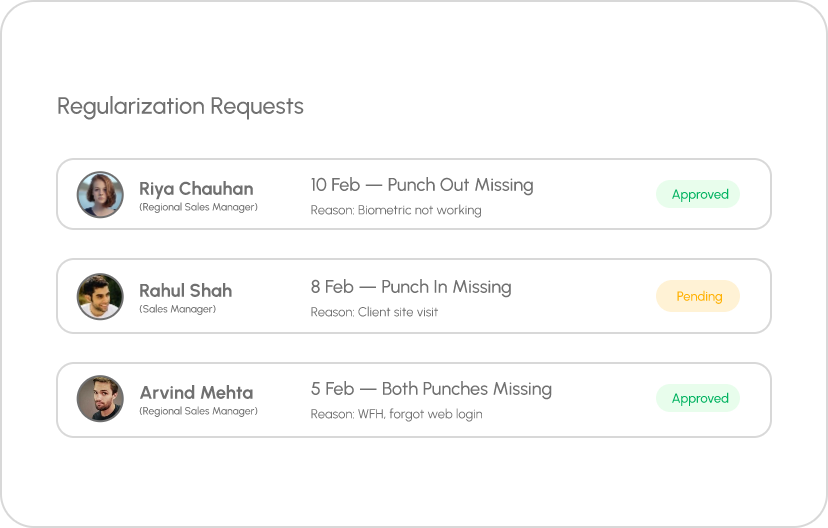
Missed punches happen — biometric issues, forgot to check-in, site visits without access. WingsOffice lets employees submit regularization requests with reasons and timestamps, routed through approval workflows. Clean attendance, zero disputes.
WHAT IT MATTERS
Clean Attendance Records, Without the Drama
Tracking leave on spreadsheets leads to errors, disputes, and payroll discrepancies. WingsOffice automates every aspect from policy enforcement to balance calculations so HR can focus on people, not paperwork.

Self-Service Requests
Employees submit regularization requests directly from their portal select the date, specify the missed punch time, add a reason. No emails, no forms, no delays.

Multi-Level Approvals
Requests are routed to the reporting manager for approval. Managers see the employee’s original attendance data alongside the full request context for informed decisions.

Complete Audit Trail
Every regularization is logged — who requested, when, the original data, the corrected data, who approved, and when. Nothing falls through the cracks.

Policy-Based Limits
Set limits on how many regularization requests an employee can submit per month. Prevent misuse while maintaining flexibility for genuine cases.

Auto Attendance Update
Once approved, the attendance record is automatically updated — no manual correction by HR. The corrected data flows into payroll calculations seamlessly.

Smart Notifications
Employees get notified of missed punches daily. Managers get pending approval reminders. Everyone stays in the loop without manual follow-ups.
WHAT IT MATTERS
Three Steps to Clean Records
1
Field Sales Teams
Sales reps visiting clients can’t access office biometric devices. They submit regularization requests from their phones with location proof managers approve with full visibility.
2
Remote & Hybrid Workers
WFH employees who forgot to log in through the web portal can regularize their attendance the same day. No salary deductions for genuine work done from home.
3
Biometric Device Failures
When fingerprint scanners malfunction or power outages hit, entire teams miss punches. Bulk regularization lets HR fix attendance for affected employees in one go.
BEYOND STANDARD LEAVES
Every Leave Scenario, Handled Automatically
scenarios that other tools ignore.

Compensatory Off
Sales reps visiting clients can’t access the office biometric devices. They submit regularization requests from their phone with location proof, and managers approve with full visibility.
GPS location attached
Client visit proof included

Work From Home Tracking
WFH employees who forgot to log in through the web portal can regularize their attendance the same day. No salary deductions for genuine work done from home.
Web login timestamps
Manager-verified work proof

Biometric Device Failures
When fingerprint scanners malfunction or power outages hit, entire teams miss punches. Bulk regularization lets HR fix attendance for affected employees in one go.
Bulk requests supported
Device failure logging
Go Live in 4 Simple Steps
Most teams are up and running the same day.
Sign Up
Create your free account in under 2 minutes. No credit card required.
Configure
Set up company profile, policies & workflows with our guided setup wizard.
Onboard Team
Invite your team via email or bulk upload CSV. They’re ready in minutes.
Go Live
Start managing HR with AI power. Most teams are live the same day.
Frequently Asked Questions
Common Questions
A payroll software with miss punching management enables employees to submit attendance regularization requests for missed clock-ins or clock-outs while following predefined approval workflows. This helps HR teams maintain accurate attendance records, reduce manual corrections, and ensure payroll is processed fairly and efficiently.
Yes, advanced HRMS and payroll systems allow administrators to define limits on attendance regularization requests based on company policies. This helps prevent misuse, encourages attendance discipline, and streamlines the approval process for HR and managers.
Most HRMS platforms support automated reminders, escalation workflows, or configurable approval timelines when managers do not respond within the specified period. These features help prevent delays in attendance finalization and ensure payroll processing remains on schedule.
Yes, approved attendance regularization requests can directly impact payroll by correcting working hours, attendance status, overtime, or leave calculations. Integrating attendance with payroll helps ensure employees receive accurate salary payments while maintaining compliance with company policies.
Miss punching can occur due to forgotten clock-ins or clock-outs, biometric device issues, mobile connectivity problems, remote work scenarios, shift changes, or technical interruptions. An HRMS with attendance regularization helps organizations resolve these discrepancies efficiently while maintaining accurate attendance and payroll records.


